
The short answer
A CRM (customer relationship management system) is a shared record of every buyer, every plot and every conversation. For a developer, its value is simple: nobody has to ask who is dealing with a plot, whether the buyer's solicitor has been chased, or which reservations are due to exchange this month.
It does not need to be large or expensive to be useful. It needs to match how your sales process works and be the one place everyone looks. We build these systems, so this comes from doing the work.
Why spreadsheets and shared inboxes break down
A spreadsheet works for the first few plots. Then a second phase is released, a second person starts editing, and enquiries arrive from the website, the portals and the show home at once. Good websites for property developers send every enquiry somewhere structured, and a spreadsheet is rarely structured enough for long.
| Symptom | Likely cause | What to do |
|---|---|---|
| Two people contact the same buyer | No owner recorded against the enquiry | Assign every enquiry to a named person |
| Nobody is sure if a plot is reserved | Availability kept in several files | Hold plot status in one place |
| Buyers go quiet after a viewing | No prompt to follow up | Set a reminder at each stage |
| Exchange deadlines slip | Dates live in someone's head or inbox | Record dates and prompt the chase |
| Board reports take a day to compile | Figures copied by hand | Report straight from the record |
If you are weighing up whether you have outgrown your current set-up, our comparison of CRM vs spreadsheet goes through the tipping points.
The pipeline stages
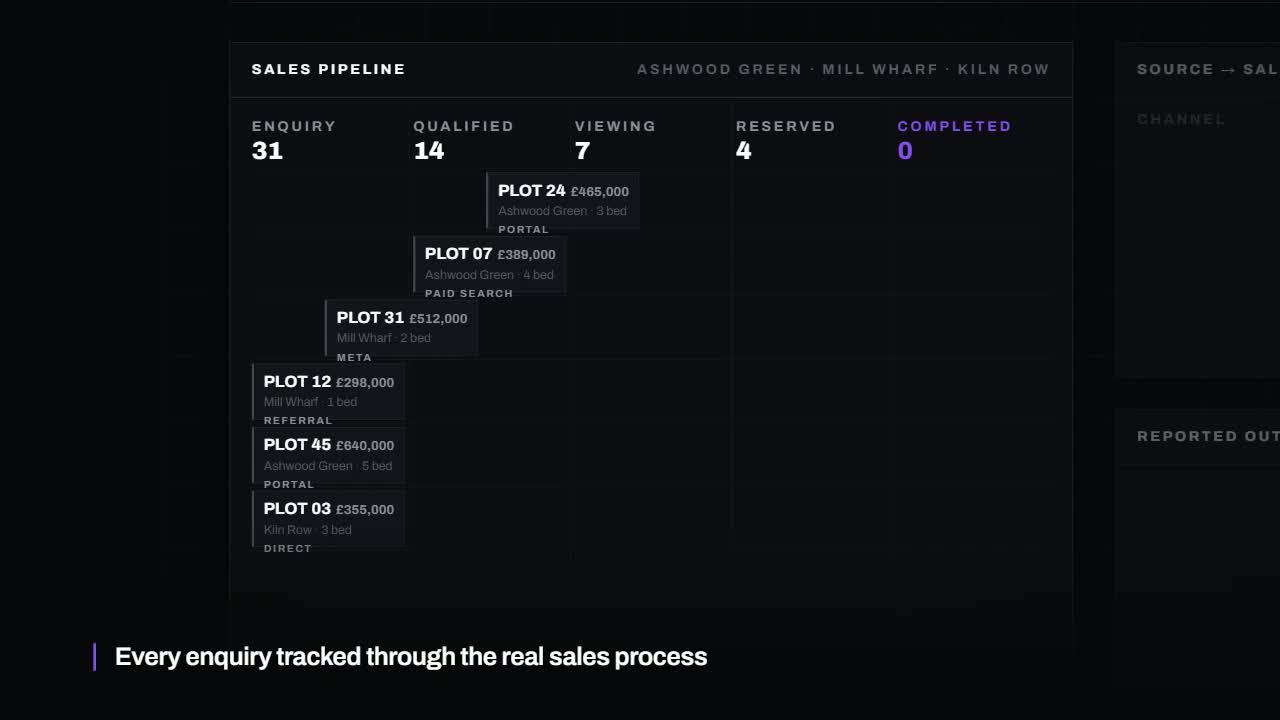
A pipeline is the set of stages a buyer moves through. Keep it short and use the words your sales team already uses. A buyer should only ever be in one stage, and moving them on should take one action.
- Enquiry: a new contact with a source and, ideally, a plot or house type.
- Viewing: an appointment booked, then attended or missed, with notes.
- Reservation: a plot held for a named buyer, with the date and the agreed deadline to exchange.
- Exchange: contracts exchanged, with solicitor details and the expected completion date.
- Completion: keys handed over, followed by aftercare.
Add a clear place for buyers who are not ready or have dropped out, with the reason. Those reasons are useful when you plan how to generate more property buyer enquiries of the right kind.
What to record against each buyer and plot
The buyer
Contact details and preferred contact method, where the enquiry came from, what they are looking for, their position (first-time buyer, home to sell, cash or mortgage), solicitor and broker details once known, and a dated note of every conversation. Record their marketing consent too.
The plot
Plot number, house type, phase, price, status (available, reserved, exchanged, completed), the linked buyer, key dates and any agreed extras or incentives. Linking buyer and plot is what makes the system useful. It also shows which plots attract interest and which need help, and that feeds the wider plan in our guide on how to market a new property development.
Automation that keeps people in control
Automation should take away the remembering, not the judgement. The system prompts and records. A person decides and speaks.
- An instant acknowledgement when an enquiry arrives, with a named contact and show home times.
- A task for the sales team when a new enquiry has had no personal reply.
- Viewing confirmations and reminders to the buyer.
- A prompt to follow up after each viewing.
- Reminders as a reservation approaches its exchange deadline.
- Website availability updated when a plot's status changes.
Leave anything sensitive to people: price conversations, a buyer whose chain has collapsed, a decision to extend a reservation. Write automated messages so they sound like your team, and review them regularly. Tools such as Zapier, Make or n8n can connect a website form to a CRM without replacing either.
Reporting for the board or lender
Directors and funders ask the same questions each month: how many plots are available, reserved, exchanged and completed, what is due to exchange, and where enquiries are coming from. If the data is kept current as part of daily work, the report is a view of the system, not a separate job. Agree the format with whoever receives it before you build anything.
Off-the-shelf or custom
There are CRMs made for housebuilders, general CRMs such as HubSpot that can be configured, and custom builds shaped around your own process.
Off-the-shelf property systems come with plots, stages and reports already defined, which suits developers whose process is close to the standard. They can feel heavy for a small team, and you adapt to them. A custom build fits how you already work and connects to your website and reporting, but it needs a clear brief and someone to maintain it. Start from the process, not the product: write down your stages and what you report, then see which option fits.
- Can it hold plots and phases, not only contacts?
- Can website and portal enquiries arrive without retyping?
- Can it produce the report your board or lender asks for?
- Who can change it when your process changes?
- Can you export your data if you move on?
Data protection care
A buyer record holds personal and financial details. Limit who can see what, keep only what you need, decide how long you keep records for people who did not buy, and record marketing consent properly. UK data protection law applies. This is not legal advice, so check your own obligations.
Common mistakes
- Buying a system before writing down the sales process.
- Keeping the old spreadsheet running alongside the CRM.
- Too many stages and required fields, so nobody fills them in.
- Automated emails that pretend to be personal and get the details wrong.
- No owner for plot status, so the website and the record disagree.
- Giving everyone access to everything.
Common questions
Is a CRM worth it for a small developer?
If you have one small scheme and one person handling sales, a well-kept spreadsheet may be enough. Once there are several people, phases or enquiry sources, a shared system usually saves more time than it takes to set up.
Can it connect to our website and the portals?
Website forms can usually pass enquiries straight in, with the plot and source attached. Portal enquiries often arrive by email and can be captured from there. What is possible depends on the systems involved, so check before committing.
Who should own it?
One named person, usually whoever leads sales. They keep the stages tidy, check plot status matches reality and make sure new starters are shown how to use it.
How long does it take to set up?
It depends on scope. A simple pipeline with enquiry capture and reminders is a small project. Reporting, website links and moving old records across add time, so agree the scope in writing first.
What to do next
Write your stages on one page, list what you report each month, and note every place an enquiry currently lands. That page is the brief for any system, bought or built.
If your website is where most enquiries start, ask for our free 24-hour audit. A founder records a personal video walkthrough of your website within 24 hours, including how enquiries are captured and where they go next. No call is needed, and a 15-minute call is optional.
Want this applied to your website?
George or Nicholas will record a personal walkthrough of your site within 24 hours.
Not ready for an audit? See Websites and systems for property developers.